

This learning blog will guide into the process of creating a Custom Ruleset for critical permissions to monitor the critical authorizations in SAP GRC, specifically when customers need to apply various conditions using AND/OR logic.
Creating a Critical Permission Ruleset without Action:
When building a custom Ruleset for critical permission (without action), we cannot leave the “Permission Group” (Action) column as empty in the function permission file. To address this, the Permission Group should be maintained with a Dummy Action. The Dummy Action should start with ^! Followed by any characters (up to 48).
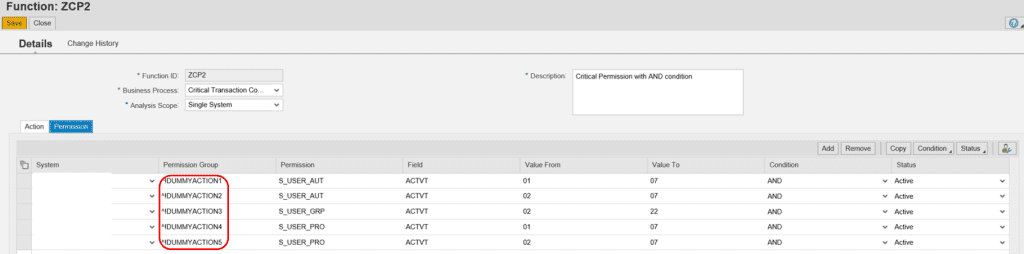
When creating a critical permission in SAP GRC, it is important to note that the system does not allow a mix of AND/OR conditions for multiple values of the same field within an authorization object group. It is recommended to create a separate Function ID if you need to apply a mix of AND/OR conditions for multiple values of the same field within an authorization object group.
For Example, if we set the values of an Authorization object like below:
- ACTVT 01 AND
- ACTVT 03 OR
System will automatically replace AND with OR as below, once you save the Function.
- ACTVT 01 OR
- ACTVT 03 OR
NOTE: Use AND when the user needs to meet all the conditions. Use OR when the user needs to meet at least one condition.
Below are some examples of different AND/OR conditions:
Scenario #1: How the combination of AND/OR conditions works for the same authorization object?
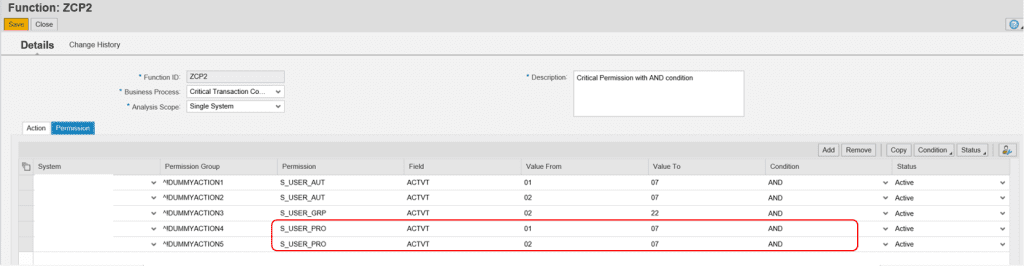
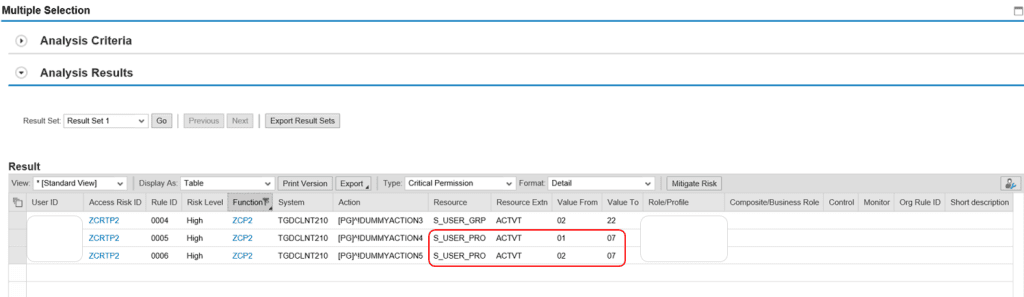
If the same authorization object has both AND/OR conditions for any field, such as the authorization object S_USER_PRO with the ACTVT field containing the values (01 OR 02) AND 07, it can be maintained as 01 AND 07, 02 AND 07. The system will read the values as 01 OR 02 OR 03 OR 06 OR 07
| Auth Obj without Tcode | AND Condition |
|---|---|
| S_USER_GRP | ACTVT = 02 AND 22 |
| S_USER_PRO | ACTVT = (01 OR 02) AND 07 |
| S_USER_AUT | ACTVT = (01 or 02) AND 07 |
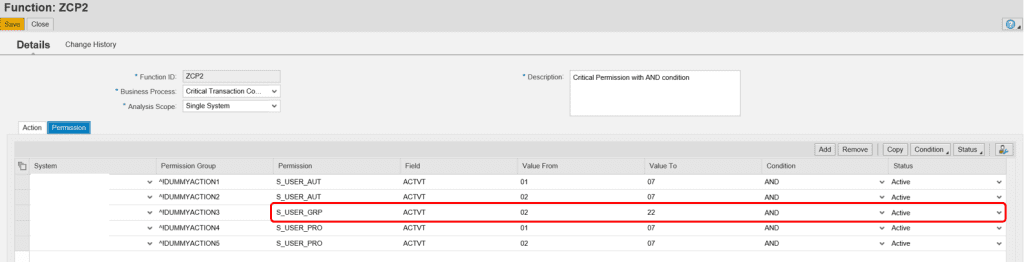
Please refer to the below figures for more understanding. Apply the above-mentioned condition in the Function Permission file:
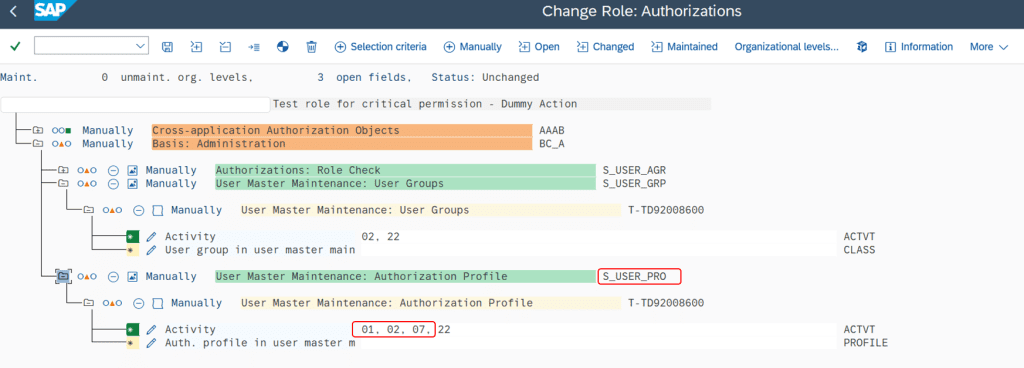
Maintain the values 01 AND 07, 02 AND 07 for the S_USER_PRO authorization object in a role, then save, generate the role, and assign it to the test user.
Scenario 2: Understanding of "Value From" and "Value To" when maintained with an AND condition:
The following example will demonstrate how the system will read “Value From” and “Value To” when maintained with an AND condition.
If the authorization object S_USER_GRP has the ACTVT field maintained as 02 AND 22, the system will read as the ACTVT value 02 OR 03 OR 06 OR 07 OR 08 OR 22.
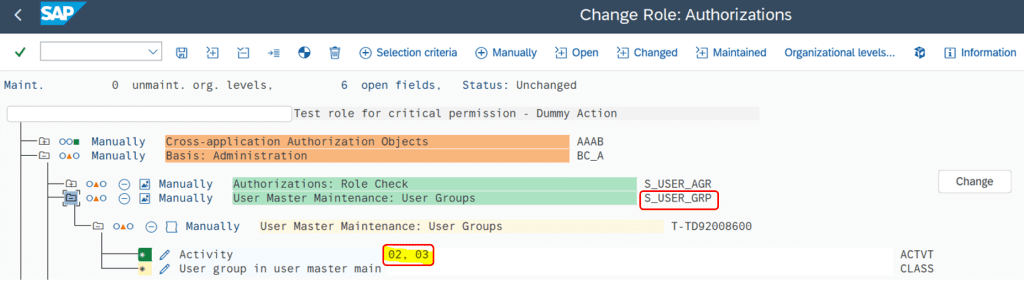
Maintain the values 02, 03 for the S_USER_GRP authorization object in a role, then save, generate the role, and assign it to the test user.
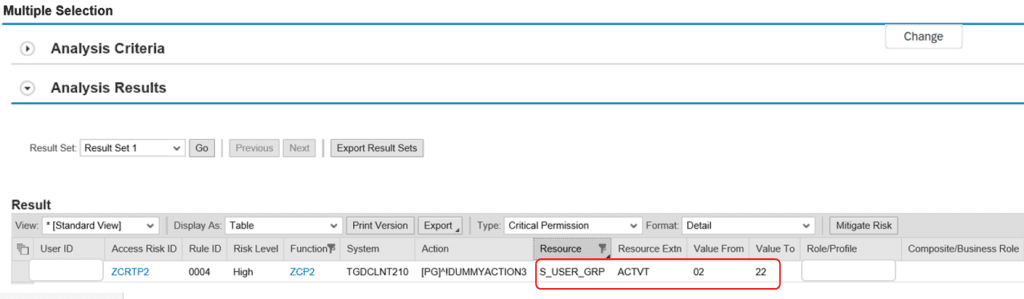
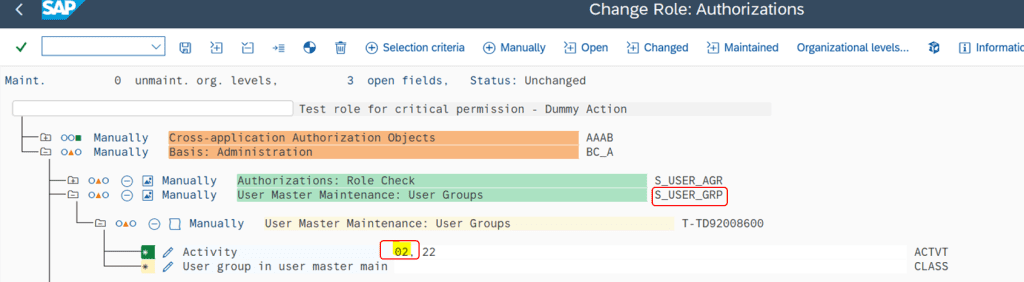
Result: Since the ACTVT value is maintained as 02 AND 22 in the rulebook, the system will read as the ACTVT value 02 OR 03 OR 06 OR 07 OR 08 OR 22 and the output is displayed accordingly.
Scenario 3: Maintaining Critical Permission without Tcode (OR Condition)
| Auth Obj without Tcode | OR |
|---|---|
| S_USER_GRP | ACTVT = 01 OR 02 |
Function can be maintained in below 2 ways:
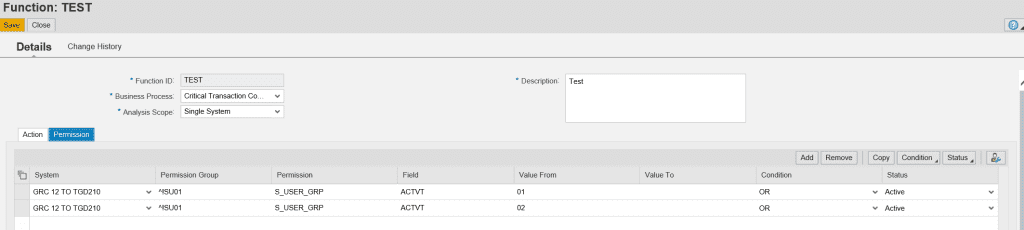
When setting up the OR condition for ACTVT = 01 OR 02, the system will automatically switch the condition to AND. I attempted to maintain separate line items for each activity, and now the system automatically changes the condition to OR for all line items, allowing ACTVT = 01 OR 02 to be maintained with an OR condition.

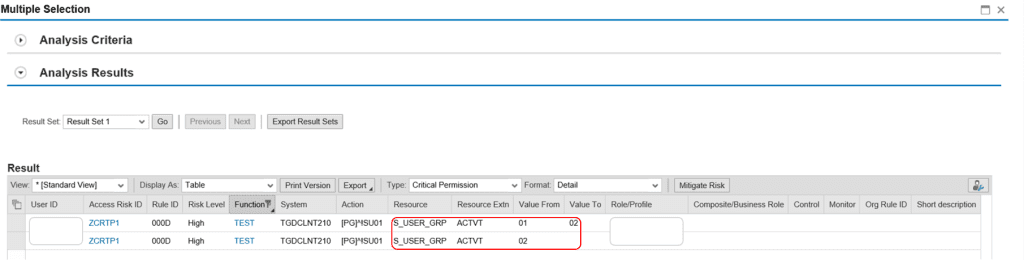
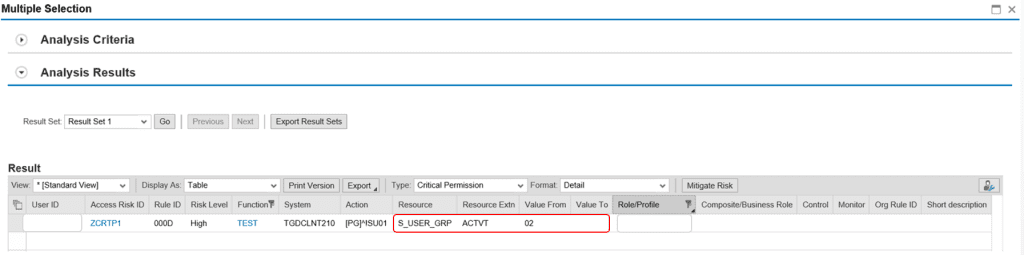
When you maintain separate line items for each activity value with an OR condition, as shown in the figure above, and assign an ACTVT value of 02 in a role, performing a risk analysis will display the risk twice for line items 1 and 3 from the figure.
Maintaining ACTVT 02 for the authorization object S_USER_GRP
Result:
- Maintaining the ACTVT Values “ACTVT= 01 OR 02”, in separate line items with OR condition
Result:
Scenario 4: Critical Permission without Tcode (OR Condition) – Continuation of Scenario 3
How multiple values of same filed within a permission object group to maintain?
When we have multiple values of same filed within an permission object group, system will automatically take the values to OR
| Auth Obj without Tcode | OR |
|---|---|
| S_DEVELOP | ACTVT = 16; OBJTYPE = FUGR OR PROG |
| S_DEVELOP | ACTVT = 01 OR 02 |
| S_DEVELOP | ACTVT = 02; OBJTYPE = DEBUG |
Eg: When you maintain the Field OBJTYPE = FUGR OR PROG (OR Condition) and again when you maintain OBJTYPE = DEBUG with AND condition, system will automatically convert to OR
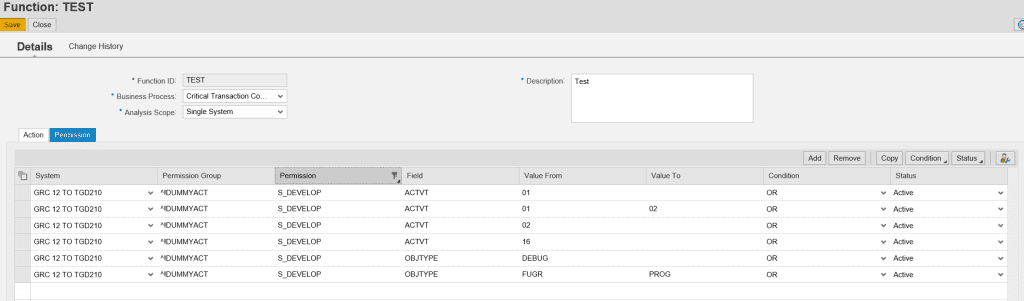
Result:

Conclusion: Creating a custom critical permission needs additional understanding and customization which is covered in this blog. The steps to maintain other types of risks such as SoD, and Critical Action are outlined in the other learning blogs.
Read More: How to automatically assign role collections in SAP BTP
