
Running the Diagnostic Tool:
The GRAC_HANA_PLUGIN_CHECKER report is tailored for SAP Access Control users. It verifies that the necessary HANA plugins required for SAP GRC operations are correctly installed and activated, ensuring optimal performance and compliance with system requirements.
Executing GRAC_HANA_PLUGIN_CHECKER report?
There are no special authorizations required to run the report. You can launch the GRAC_HANA_PLUGIN_CHECKER report from SA38 or SE38 transaction code. However, ensure that your SAP GRC system meets the below prerequisites:
Prerequisites: The tool is available as a standard report starting from Service Pack 25 (AC 10.1) and Service Pack 5 (AC 12.0). Alternatively, it can be installed by implementing SAP Note 2787434 via the SNOTE tool.
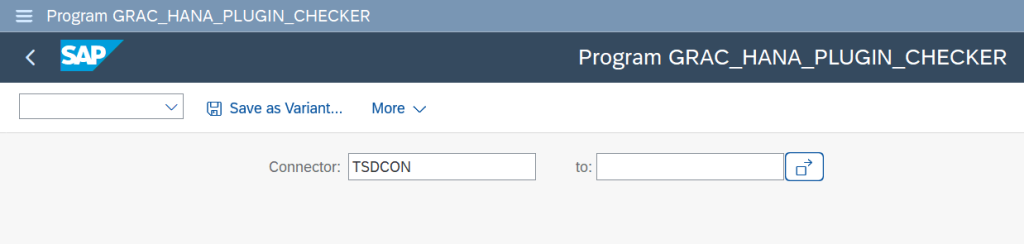
Once executed, the tool identifies missing database objects in the HANA DB as shown in the below figure:

You can also review the detailed results in the SLG1 log. Errors, highlighted in red, signify missing objects or configurations that must be fixed to utilize all the functionalities. Refer to the figure below:
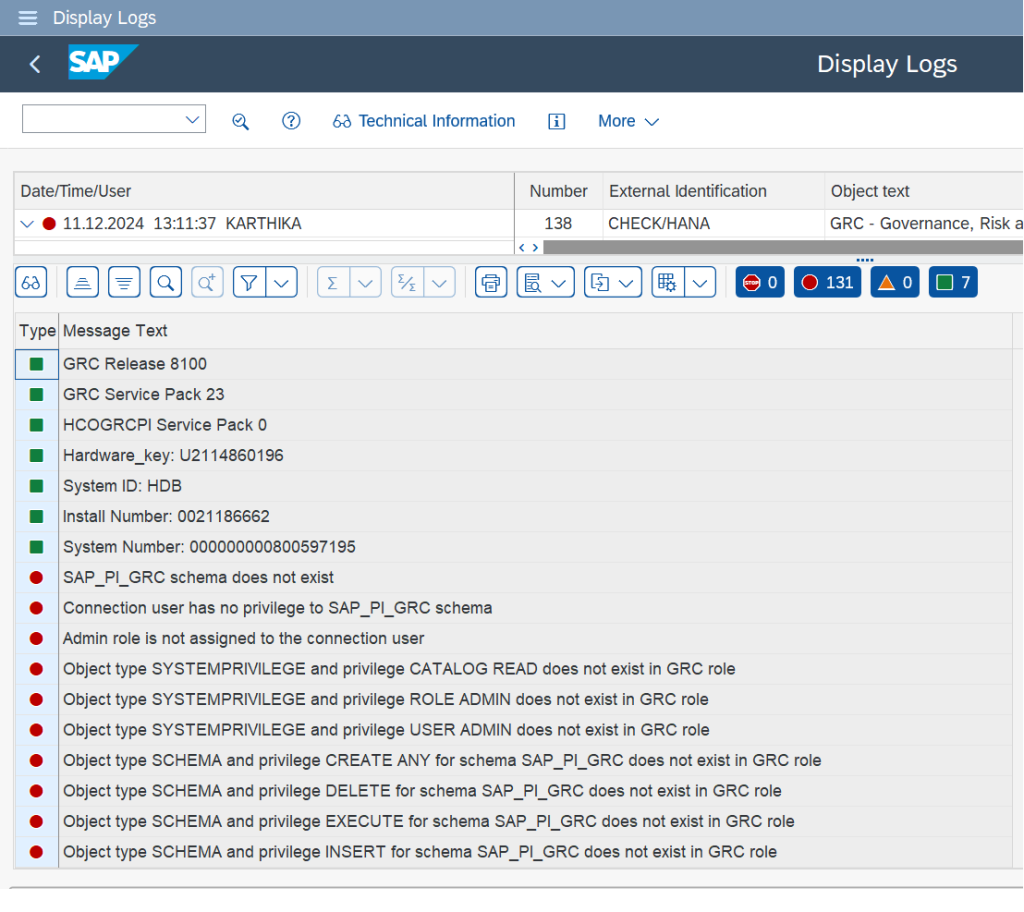
Important Note: The solution assumes that no SAP Notes were applied after the Service Pack installation. If any Notes were implemented afterward, they must be reapplied in the correct sequence. For example: If the log indicates that the SAP_PI_GRC schema does not exist, the schema must be created, and the installation must be performed from the beginning. SAP Note 2787434 provides more guidance. The Note includes:
- A downloadable attachment listing the missing objects and their respective solutions.
- Step-by-step instructions for resolving issues related to missing database tables, views, procedures, functions, and public synonyms.
Below is the Basic installation check from the attachment (extracted from SAP Note 2787434)
BASIC INSTALLATION CHECKS:
| Missing object | Solution | Notes |
|---|---|---|
| The name of the object in the report | What you need to do if this check fails | Notes for the solution |
| SAP_PI_GRC schema | Create SAP_PI_GRC schema and start the installation from the beginning | GRC HANA Plugin can only work if it is implemented into SAP_PI_GRC schema |
| Connection user has no privilege to SAP_PI_GRC | Assign role sap.grc.pi.ac.roles: :SAP_GRC_PI_ADMIN to the connection user | Connection user requires full privileges to SAP_PI_GRC schema |
| Admin role not assigned to the connection user | Assign role sap.grc.pi.ac.roles: :SAP_GRC_PI_ADMIN to the connection user | The role contains the minimum required authorizations that requires for all the functionalities to be work properly. |
| Object type and privilege (for schema ) not exists in GRC role | The GRC admin role (sap.grc.pi.ac.roles: :SAP_GRC_PI_ADMIN) has missing authorization. You can directly assign the missing privilege, or you can start the installation from the beginning. |
Solution Coverage:
The attachment accompanying SAP Note 2787434 provides solutions for:
- Database tables
- Database views
- Procedures
- Functions
- Public synonyms
By following these steps, you can resolve the identified issues and ensure the proper functioning of the SAP GRC plugins integrated with the HANA database.
Read More: Understanding PAM service in SAP Cloud IAG