
The standard Role based authorization (RBAC) model is well fit to restrict users authorization at a transaction code/Fiori app, activity, org value level. But, they were never built to control what appears on the screen once access is granted, or to record who read the specific data. With the surge in data leaks, it is imperative to add an additional layer of Security – The Data Layer which is possible with SAP UI Masking and UI Logging solutions.
Most sensitive data does not leave an SAP system through a hacker or a compromised user account. It leaves through your insiders via the screens people open every day, doing the exact work they were hired to do.
Take a common case. A consultant was hired to support the HR function, so he is given access to employee data. The periodic access review looks good: no wider access, no segregation of duties conflict. Everything looks clean from an audit standpoint. Yet that same consultant can now pull up payroll figures, salary details, and personal identification numbers. He may never print a record or take a screenshot. He might simply copy a few numbers onto a notepad and walk out of the building with them. Nothing in the role design stops him.
This is where role-based access is not enough. Roles are good at answering one question: can this person get in and run this transaction? They were never built to answer the other question that keep a data protection officer up at night. What can this person see once they are inside? And is anyone keeping a record of who looked at what?
The answer is UI Data Protection Masking & UI Data Protection Logging.
What is SAP UI Data Protection Masking?
“SAP UI Data Protection Masking” or “UI Data Protection Masking” helps enterprises to mask sensitive data fields on the screen unless a user is specifically allowed to see it. It doesn’t restrict user from execution transaction codes, but masks sensitive data that needs to be protected. A masked field shows placeholder characters instead of the real value, so the record stays usable while the sensitive detail stays protected.
UI Masking happens on the server, at the user interface layer only. It does not change the stored value in the database and it does not touch the application logic underneath. Reports, batch jobs, interfaces, and analytics continue to run on the real data, and only the on-screen display is controlled with the SAP UI data protection masking module.
The solution masks fields across SAP GUI, Web Dynpro ABAP, Web Client UI, and SAPUI5 and Fiori applications, so protection stays consistent whether a user works in the classic SAP GUI or a modern Fiori app.
What is SAP UI Data Protection Logging?
SAP UI Data Protection Logging is the underlying application that records who viewed sensitive business data, when, and in which transaction. It utilizes Read Access Logging (RAL) engine. While the standard SAP logs are strong at capturing change documents, they doesn’t capture read activities.
The output is a structured, searchable record that a data protection officer or audit team can analyze. It answers a question that most SAP systems cannot answer on their own: who actually looked at this person’s data, and was that access appropriate?
UI Data Protection Masking vs UI Data Protection Logging
| Dimension | SAP UI Data Protection Masking | SAP UI Data Protection Logging |
|---|---|---|
| Control type | Preventive. Stops sensitive values from being displayed. | Detective. Records that sensitive values were viewed. |
| Core purpose | Limit who can see a field in plain text. | Create an audit trail of read access to a field. |
| User experience | Field shows placeholder characters unless authorized. | No visible change for the user. Access is recorded silently. |
| Best used when | Data should be hidden from most users by default. | Data must stay visible but access must be provable. |
| Data impact | None. Works at the UI layer only. | None. Reads the access event, not the record. |
Why Enterprises Need UI Data Protection Masking & Logging Now?
Data privacy law is now enforceable and expensive
No data protection law names UI Masking or UI Logging. What these laws do is set the standard that the two controls help an organization meet. The GDPR established the template, and most modern privacy laws now follow it, including India’s Digital Personal Data Protection Act, 2023, along with the CCPA and CPRA in the United States, the LGPD in Brazil, the PDPA in Singapore, and POPIA in South Africa.
Each one places clear obligations on organizations that handle personal data, and each is backed by real financial penalties. Under the GDPR, fines can reach 4 percent of a company’s global annual turnover. India’s DPDP Act carries penalties of up to ₹250 crore.
The common point is what regulators now expect an organization to prove. It is no longer enough to say that access to personal data could be restricted. The expectation is to show that access is both limited and monitored in practice. Masking demonstrates the limitation. Logging demonstrates the monitoring.
Insider exposure is the hardest risk to see
Most data incidents linked to insiders come from accidental or negligent actions rather than malice. Yet when a malicious insider is involved, the cost is the highest of any attack type, averaging 4.92 million dollars per incident.
The same study puts the global average breach cost at 4.44 million dollars, rising to a record 10.22 million dollars in the United States. A large share of that risk sits with people who already have legitimate access. Source: IBM Cost of a Data Breach 2025
Standard SAP security was not designed for this
What Gets Protected, and When
Masking and logging are usually applied to the data that is classified by the regulatory and business critical. Personal identifiers such as SSN, Aadhaar, passport, and other national ID numbers; bank account and card details; salary, compensation, and other HR data; customer and vendor master information; and intellectual property such as pricing, formulas, and contract terms.
Common scenarios include the following:
- Protecting HR and payroll data from IT and Basis support teams who need system access but not personal detail.
- Hiding bank and payment data from users who only need to view an invoice or a posting.
- Masking PII from offshore or third-party support staff while still allowing them to resolve tickets.
- Recording every read of high-sensitivity fields so that access can be reviewed during an audit or investigation.
How the Solution Works
Access is granted on top of existing SAP authorizations, not instead of them. By default, a configured sensitive field is masked for everyone. A user sees the real value only after an explicit, separate authorization is added on top of normal role access.
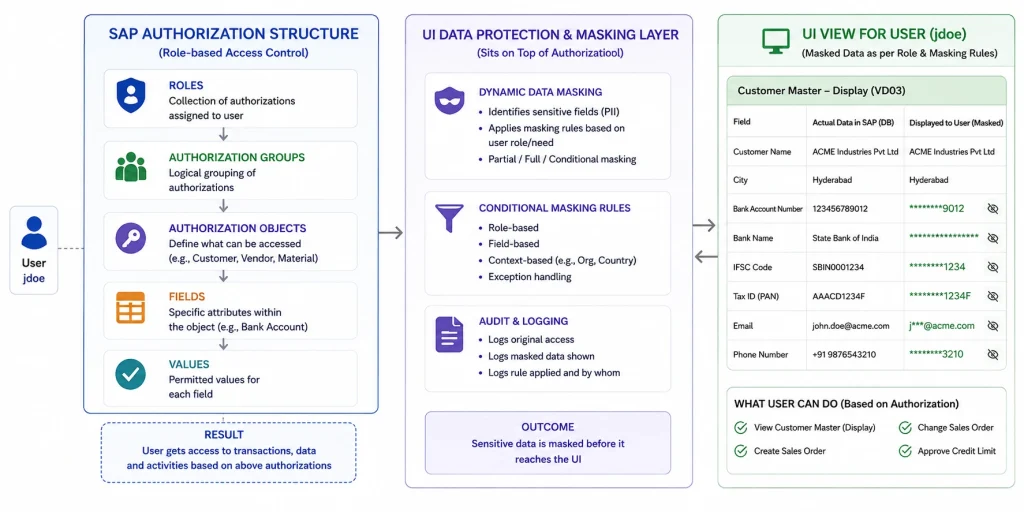
Masking can be either a role-based or context-based. Role-based masking reveals or hides a field according to the user’s assigned authorization. Context-based masking uses conditions, so a value is revealed only in a specific situation, for example when a vendor belongs to a particular account group. Conditional rules of this kind are handled through the solution’s Business Add-In, known as a BADI.
Because masking works only at the UI layer, batch jobs, interfaces, and analytics keep running on the underlying data without disruption. Logging operates alongside masking, capturing read access so that sensitive views can be reviewed after the fact. The two solutions now share a single technical add-on, which lets rules and objects be reused across masking and logging.
Implementation Realities to Consider
Deciding what to protect
Getting the authorization base right
Managing performance and scope
Custom and legacy screens
How ToggleNow Helps
ToggleNow implements SAP UI Masking and UI Logging as a governance program, not just a technical implementation. As an SAP Silver Partner focused on SAP Security and GRC since 2012, ToggleNow brings a team of more than 200 technical consultants who have delivered over 500 projects and manage more than 400,000 user identities across client landscapes. That experience shapes a delivery approach built around business outcomes and audit evidence, not configuration alone.
A typical ToggleNow engagement moves through five clear phases.
| Phase | What happens |
|---|---|
| Discover | Identify sensitive fields, map the relevant regulations such as DPDPA and GDPR, and agree the scope with business and compliance stakeholders. |
| Design | Define masking rules as role-based or context-based, set logging scope, and align the authorization model so masking rests on a clean base. |
| Build | Configure masking and logging, handle custom and legacy screens through the BADI, and unit test each rule. |
| Validate | Run user acceptance testing, check performance under realistic load, and produce audit-ready evidence of the controls. |
| Sustain | Establish a log-review routine, monitoring, and clear documentation, then hand over with knowledge transfer. |
Closing Perspective
Data protection in SAP is no longer an option. UI Data Protection Masking and Logging give organizations direct, provable control over both. The technology is mature and quick to deploy. The value comes from the decisions around it: choosing the right fields, aligning with data privacy law, and turning access logs into evidence that stands up to scrutiny. Handled well, this becomes one of the clearest and most defensible investments an organization can make in its SAP data protection posture.
Additional References:
https://help.sap.com/docs/UI_DATA_PROTECTION_MASKING/0d89267d02a1-43eab529b8738947cfe4/14c62d36fc6f4f7c82fc334918fcd73c.html