
Working with SAP IAG Workflow
The operational backbone of SAP IAG lies in its sophisticated Workflow system.
Fueled by the robust SAP Business Rules and grounded in the foundational logic MSMP & BRF+ workflow in SAP Access Control, this cloud-based solution on the Business Technology Platform (BTP) empowers organizations to create, optimize, and manage various services such as Access Request, Role Designer seamlessly. This learning blog provides valuable information on SAP IAG Workflow.
1) How does the Workflow function in SAP IAG?
IAG workflow is integrated with the SAP Cloud Platform Business Rules Service.
This integration allows the definition of stages, paths, and other workflow rules, enabling the Requests to progress through the various approval stages.
2) How to setup Workflow?
Setting up Workflow in SAP IAG is carried out in 2 stages:
1. Creating new workflow templates
2. Updating Business Rule
Creating New Workflow Templates:
1. Login to SAP IAG
2. From the Administration group, execute Maintain Workflow Template app
3. Click + sign to create a new template
4. Provide Name and Description for the new template
5. Click + sign for stages and add the relevant stages
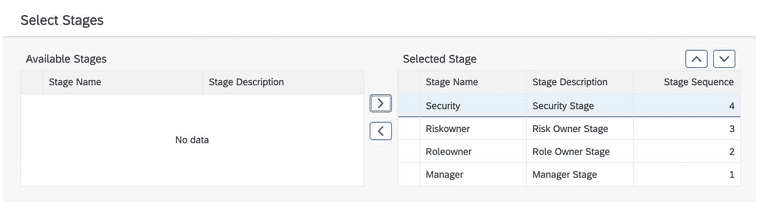
NOTE: Currently SAP IAG support only 4 pre-defined stages, i.e., Security, Risk Owner, Role Owner and Manager. No additional stages can be created.
6. Change the sequence as needed using the up/down arrows.
7. Click Save You can notice the template created as a User defined template in the list.
Updating Business Rule:
Once the template is created, the next step is to update the Business rule. Follow the steps highlighted below:
1. Login to SAP IAG
2. Under Administration group, execute Configuration app
3. Launch Business Rule
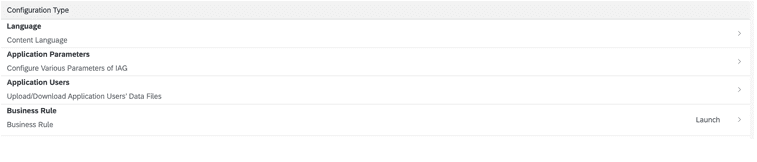
4. Click (open) “IAG Workflow Business Rule”
5. Click Edit
6. Navigate to Rulesets tab
7. Click (open) “PathRulset”
8. Click (open) “RequestTypeRule”
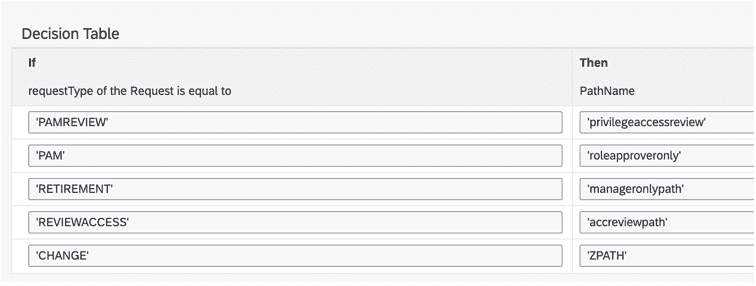
9. Maintain the Decision Table, i.e., Request Type (pre-defined values) and
PathName (created in Maintain Workflow Template)
3) What are the limitations of Workflow in SAP IAG?
Unlike SAP GRC Access Control, the Workflow in SAP IAG has less flexibility. It
accommodates only a maximum of four predefined stages, namely Security,
Manager, Role Owner, and Risk Owner. These stages are fixed and cannot be
extended or customized. SAP IAG does not permit the creation of new agents,
limiting the adaptability of its workflow structure compared to SAP GRC Access Control.
4) Can I use BRF+ Rules in SAP IAG?
SAP IAG has limitations regarding the utilization of BRF+ rules. It does not support the integration of BRF+ rules; instead, it exclusively relies on a single Decision Table, which is already provided within the Business Rule configuration. This underscores the system’s constraints in accommodating additional decision logic through BRF+ rules within SAP IAG.